Last updated: October 11, 2026 · By Serhii Yelbaiev · 7 min read
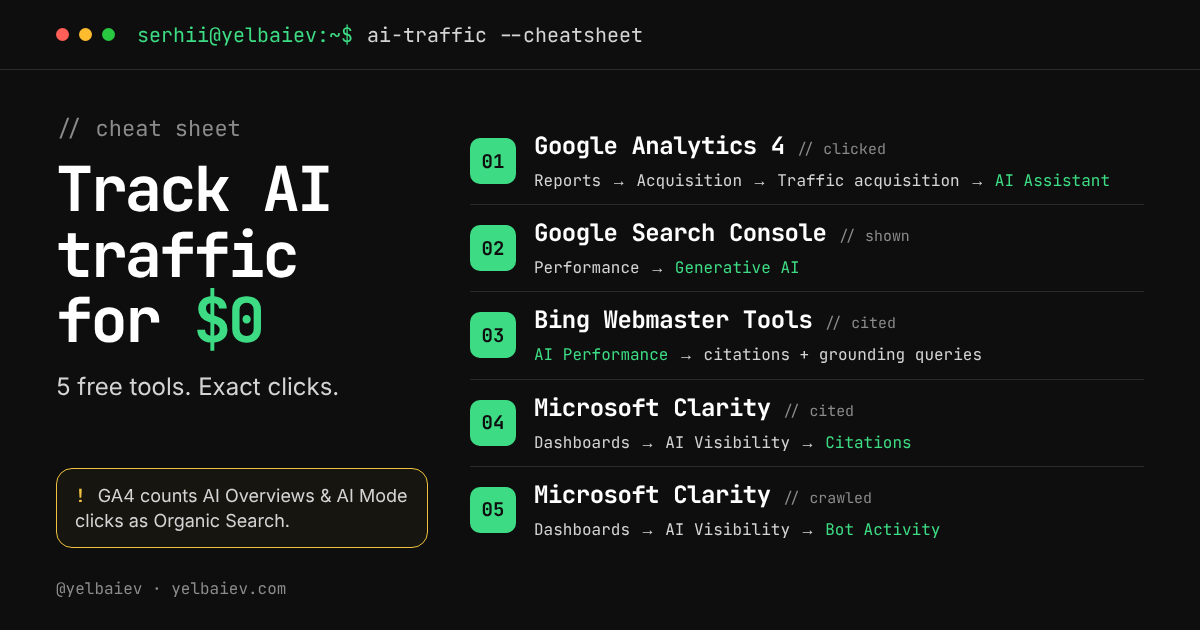
Short answer: you can track AI traffic for free with five reports: the AI Assistant channel in Google Analytics 4, Performance → Generative AI in Google Search Console, AI Performance in Bing Webmaster Tools, and the Citations and Bot Activity tabs under AI Visibility in Microsoft Clarity. Together they show whether AI tools crawl, cite, show and send visitors to your site.
Key takeaways
- AI traffic is already in your reports. It hides in Referral, Organic Search and Direct.
- GA4’s AI Assistant channel counts visits from tools like ChatGPT, Gemini, Claude, Copilot, DeepSeek and Grok.
- Clicks from Google AI Overviews and AI Mode are counted as Organic Search in GA4, not as AI Assistant.
- Search Console’s Generative AI report shows impressions only for AI Overviews and AI Mode. No clicks yet.
- Bing Webmaster Tools and Microsoft Clarity show citations: which of your pages AI answers use as sources.
- Setup takes about 30 minutes. Track the trend over time, not exact numbers, because the tools measure different things.
The AI visibility funnel: what each tool measures
AI search works in four steps. An AI bot crawls your page, an AI answer cites it, the citation is shown to a user, and the user clicks through. Each free tool covers one step, so if AI clicks are low, you can walk the funnel up and find where you drop off.
| Step | Question it answers | Free tool | Where to click |
|---|---|---|---|
| Crawled | Are AI bots reading my pages? | Microsoft Clarity | Dashboards → AI Visibility → Bot Activity |
| Cited | Do AI answers use my pages as a source? | Bing Webmaster Tools, Microsoft Clarity | AI Performance; Dashboards → AI Visibility → Citations |
| Shown | How often does Google’s AI show my links? | Google Search Console | Performance → Generative AI |
| Clicked | How many visits came from AI assistants? | Google Analytics 4 | Reports → Acquisition → Traffic acquisition → AI Assistant |
1. How do I see ChatGPT and other AI traffic in Google Analytics 4?
GA4 now has a default channel called AI Assistant. When a visit comes from a recognized AI assistant, GA4 sets the medium to ai-assistant and groups it there. Google names ChatGPT, Gemini, DeepSeek, Copilot and Grok as examples (Google Analytics Help).
- Open GA4 and go to Reports → Acquisition → Traffic acquisition.
- Make sure the table dimension is Session primary channel group (Default channel group).
- Find the AI Assistant row to see sessions, engagement and key events.
- Change the dimension to Session source to see which assistant sent each visit.
- Compare the AI Assistant conversion rate with Organic Search. That number tells you if AI visitors are worth chasing.
The GA4 traps to know
- AI Overviews and AI Mode clicks are not in this channel. Google’s documentation counts them as Organic Search. Use Search Console for those.
- Clicks from AI mobile apps often arrive without a referrer and land in Direct, so GA4 undercounts AI traffic.
No AI Assistant channel yet? Build your own
The channel is rolling out gradually. If you don’t see it, create a custom channel group: Admin → Data display → Channel groups → Create new channel group → Add new channel. Set the condition to Source matches regex, paste the pattern below, and drag the new channel above Referral. GA4 assigns each session to the first channel that matches, so order matters.
.*(chatgpt\.com|openai\.com|perplexity\.ai|gemini\.google\.com|claude\.ai|copilot\.microsoft\.com|deepseek\.com|grok\.com|meta\.ai|you\.com).*2. How do I see AI Overviews and AI Mode in Google Search Console?
Search Console has a Generative AI performance report. It shows how many times links to your site were shown in AI Overviews and AI Mode. Google rolled it out to all websites worldwide on August 31, 2026 (Search Console Help).
- Open Search Console and select your property.
- Go to Performance → Generative AI.
- Read Impressions: how often your links appeared in AI Overviews and AI Mode.
- Use the tabs to break it down by Pages, Countries, Devices and Dates.
- Use the Search type filter to compare text search with multimodal search (Google Lens, Circle to Search).
Limits: the report shows impressions only, with no clicks and no queries. The table is capped at 1,000 rows, and sites with very few AI impressions may not see the report yet.
3. How do I see Copilot citations in Bing Webmaster Tools?
Bing Webmaster Tools has an AI Performance dashboard, in public preview since February 2026. It shows how often your content is used as a source in Copilot, AI summaries in Bing and select partner experiences (Search Engine Journal).
- Sign in at bing.com/webmasters. No site there yet? Use Import from Google Search Console; it takes about a minute.
- Open AI Performance.
- Read Total citations and Average cited pages.
- Check the page table to see which URLs get cited most.
- Open Grounding queries: the phrases the AI used when it pulled your content. Use them as content ideas.
Limits: it’s a preview, and grounding queries are a sample, not a complete list.
4. How do I see AI citations in Microsoft Clarity?
Microsoft Clarity’s free Citations report shows how often AI answers reference your pages, and how you compare with other domains cited for the same queries (Microsoft Clarity blog).
- Create a free project at clarity.microsoft.com and install the tracking code. On WordPress, use the official Microsoft Clarity plugin.
- Go to Dashboards → AI Visibility → Citations.
- When asked, verify domain ownership by connecting Bing Webmaster Tools or Google Search Console.
- Read Page citations, Share of authority, AI referral traffic (the % of sessions from AI assistants) and My cited pages.
Bonus: filter Clarity session recordings by AI referrers to watch what AI visitors actually do on your site.
5. How do I see which AI bots crawl my site?
Clarity’s Bot Activity tab shows which AI crawlers request your pages. It reads server or CDN logs, so it needs one extra connection (Microsoft Learn).
- In Clarity, go to Settings → AI Visibility → add CDN Providers and connect your server or CDN. With the latest Clarity WordPress plugin, it’s on by default.
- Go to Dashboards → AI Visibility → Bot Activity.
- Read AI request share, Bot operator and Path requests to see who crawls you and which URLs they read.
Limits: it shows crawling only, not citations or clicks. Some CDN providers charge for log delivery.
Which free AI traffic tool should I use first?
| Tool | Measures | Shows clicks? | Covers |
|---|---|---|---|
| Google Analytics 4 | Visits from AI assistants | Yes, sessions | ChatGPT, Gemini, Claude, Copilot and others |
| Google Search Console | Impressions in AI answers | No | Google AI Overviews, AI Mode |
| Bing Webmaster Tools | Citations + grounding queries | No | Copilot, Bing AI summaries, partners |
| Microsoft Clarity: Citations | Citations, share of authority | AI referral % | Supported AI experiences |
| Microsoft Clarity: Bot Activity | AI crawler requests | No | AI bots and agents |
Start with GA4 and Search Console because you probably have both already. Add Bing Webmaster Tools and Clarity next, since they’re the only free tools that show citations.
A 30-minute setup plan
- Today (10 min): open GA4 and Search Console. Write down your AI Assistant sessions and Generative AI impressions for the last 28 days.
- This week (20 min): import your site into Bing Webmaster Tools and install Microsoft Clarity.
- Monthly: compare your most-cited pages with your best-converting pages. Improve the pages that convert but don’t get cited.
FAQ
Is AI traffic shown in Google Analytics by default?
Yes, if the AI Assistant channel has rolled out to your property. Look for it in Reports → Acquisition → Traffic acquisition. If it isn’t there, build a custom channel group with a Source regex and place it above Referral.
Why don’t I see Google AI Overviews traffic in the AI Assistant channel?
Google counts clicks from AI Overviews and AI Mode as Organic Search. To measure them, use the Generative AI report in Search Console, which shows impressions.
Can I see which questions people asked ChatGPT before visiting my site?
No. AI assistants don’t pass the user’s prompt. The closest free data is Bing’s grounding queries and Clarity’s cited queries, which show the phrases AI used to find your content.
Are these AI traffic tools really free?
Yes. GA4, Search Console, Bing Webmaster Tools and Microsoft Clarity are free. The only possible cost is CDN log delivery for Clarity’s Bot Activity, which some providers charge for.
Why do the numbers differ between tools?
Each tool measures a different step: crawls, citations, impressions or visits. They also cover different AI products. Compare trends inside each tool rather than matching numbers across them.
Sources
- Generative AI performance report, Search Console Help
- Google Search Console AI reports rolled out worldwide, Search Engine Journal
- Traffic-source dimensions and default channel group, Google Analytics Help
- Bing Webmaster Tools adds AI citation performance data, Search Engine Journal
- Citations in Microsoft Clarity now generally available, Microsoft Clarity blog
- Bot Activity, Microsoft Learn
About the author. Serhii Yelbaiev is a 3x founder and the owner of Well Web Marketing, where he builds SEO, tracking and AI tools for small and mid-size businesses. Related: Link rot at web scale and practical ways to protect your traffic.
Leave a Reply